AI Code Review with Cursor - How I Reduced Review Time from 45 Minutes to 10 Minutes
A practical guide to AI code review with Cursor. Learn how I reduced pull request review time from 45 minutes to 10 minutes using command-based review rules, structured reports, and human-in-the-loop validation.
AI Code Review with Cursor: How I Reduced Review Time from 45 Minutes to 10 Minutes
I’m Harry Lee.
If you are searching for how to use Cursor for code review, how to speed up pull request review, or whether AI code review actually works in a real engineering workflow, this article is a practical answer.
In day-to-day frontend development, Code Review (CR) is one of the most important safeguards for code quality. But in a fast iteration cycle, CR can easily become time-consuming, mentally exhausting, and highly dependent on the reviewer’s current state.
One thing became increasingly clear to me in real engineering practice:
Humans are better at judging business logic and contextual correctness, but they are much more likely to make mistakes on repetitive, rule-based checks.
For example:
- teams often have many conventions, but a specific review can still miss one
- low-level issues such as null handling, boundary checks, and exception handling are easy to overlook during repeated reviews
Because of that, we introduced a simple workflow:
Let AI perform a first-pass code review, then let humans complete the final review.
This article documents one practical engineering attempt to improve Code Review efficiency with Cursor.
Before diving into the design, it is worth noting what the AI-generated output looked like in practice. The review report could summarize code changes, identify issues, classify risk, and provide merge recommendations before a human reviewer even started the final pass.
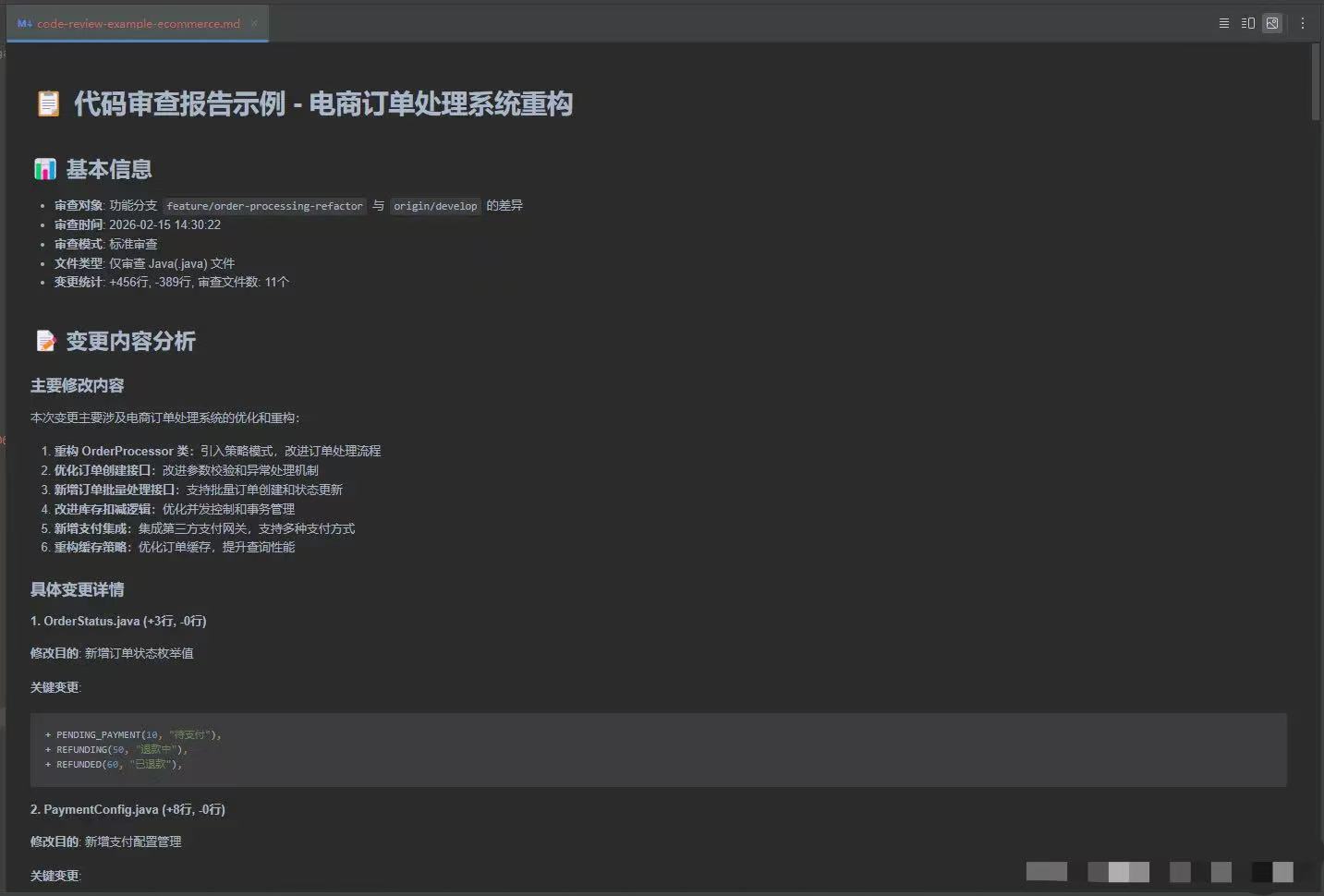
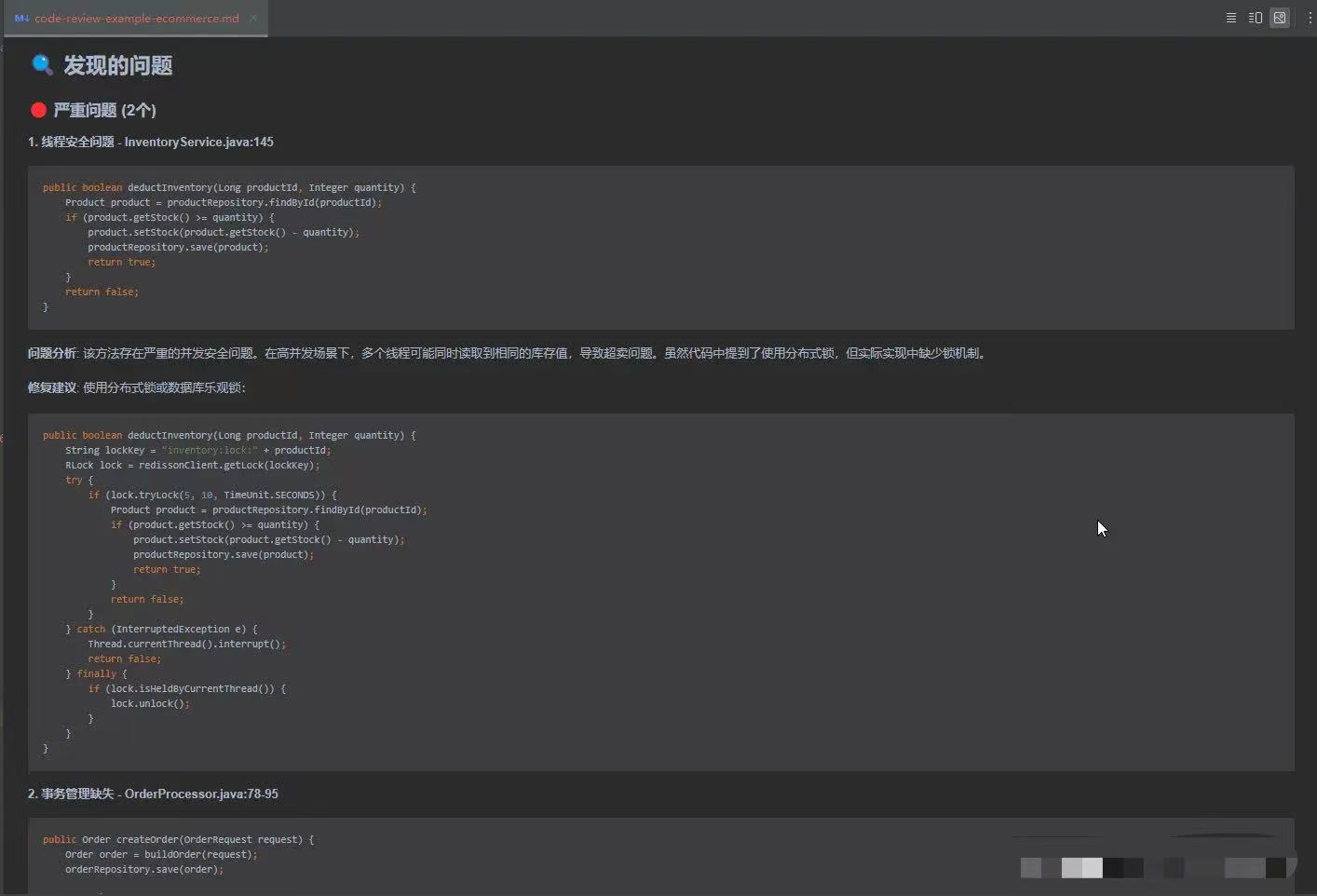
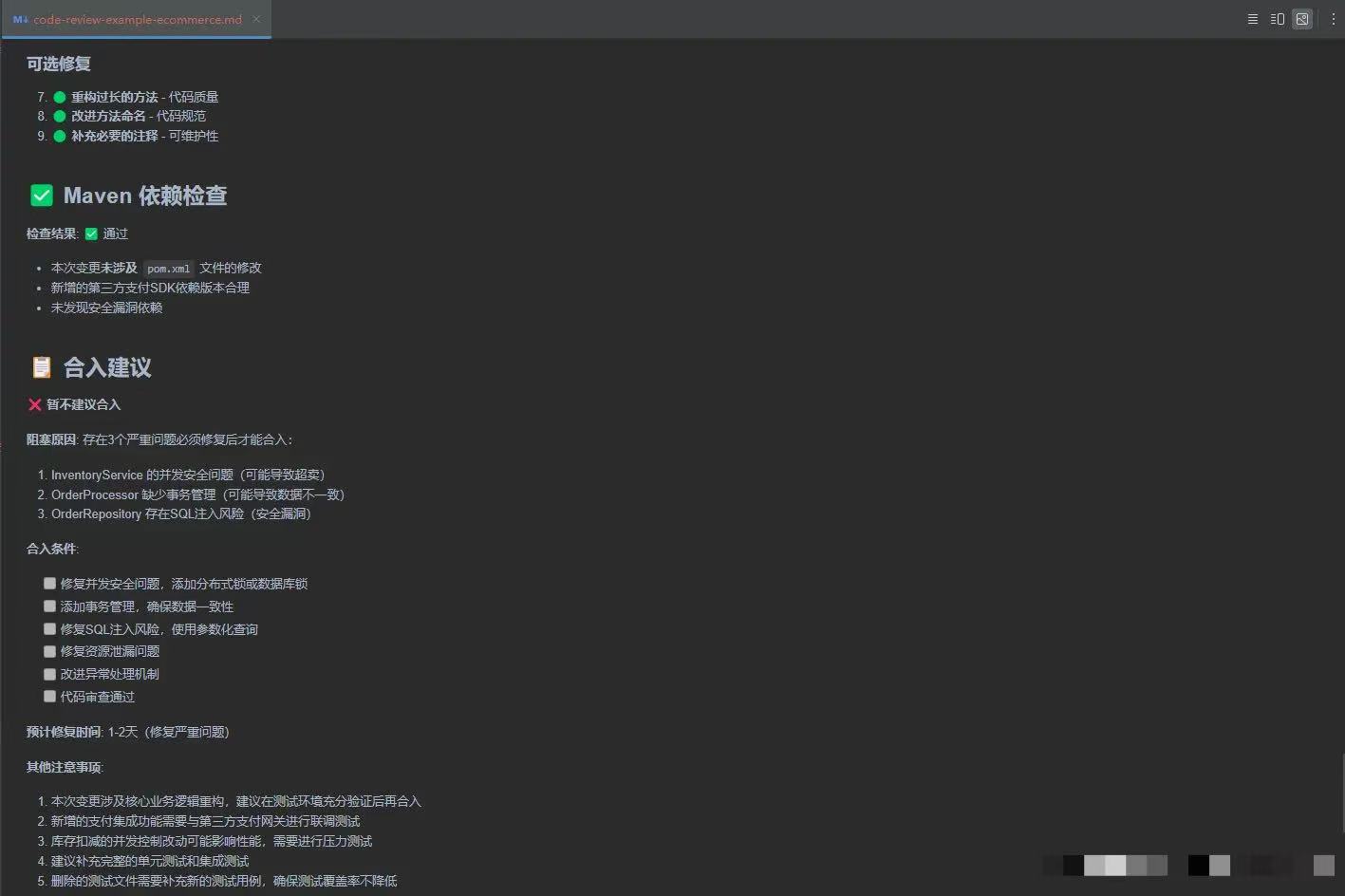
Table of Contents
- Why manual code review gets slower over time
- The limits of traditional code review
- How AI code review with Cursor works
- The review command and rule design
- Real results in engineering practice
- How to roll this out across a team
- Why human-in-the-loop review still matters
- Limitations of AI code review
- SEO summary and takeaways
1. Why Manual Code Review Gets Slower Over Time
Under a biweekly release cycle, or an even faster one, manual CR usually suffers from the same problems:
- review takes too long and drains attention
- reviewers get fatigued when checking edge cases and exception branches
- review quality fluctuates depending on the reviewer’s state
Some issues have relatively low business value to inspect manually, but carry high production risk if missed, such as null pointers, out-of-bounds logic, or weak exception handling. Those are exactly the kinds of issues that AI is good at catching early.
2. The Limits of Traditional Code Review
Without AI, code review mainly depends on:
- the individual experience of the reviewer
- team convention documents
- repeated reminders in review meetings or code discussions
That creates several obvious problems:
- onboarding is expensive for new engineers
- the larger the diff, the easier it is to miss things
- it is hard to build a unified, reusable, continuously evolving review process
In short, both efficiency and consistency are limited.
3. How AI Code Review with Cursor Works
After trying different approaches, I chose Cursor to assist with Code Review.
Cursor’s built-in Diff with Main feature is useful, but it is still closer to a personal productivity feature. It is not ideal by itself as a maintainable, team-wide review workflow.
So my approach was:
Turn Code Review into a command, and let AI execute it against a unified set of rules.
That shift matters. Once review becomes a command rather than an informal habit, the process becomes easier to standardize, share, and improve.
4. The Review Command and Rule Design
This solution has three core parts:
- define all CR rules in a single
review.md - run the review through Cursor Commands plus Git MCP
- output a structured review report as input for human review
Environment Setup
The setup used in the article includes:
- Cursor
- Git
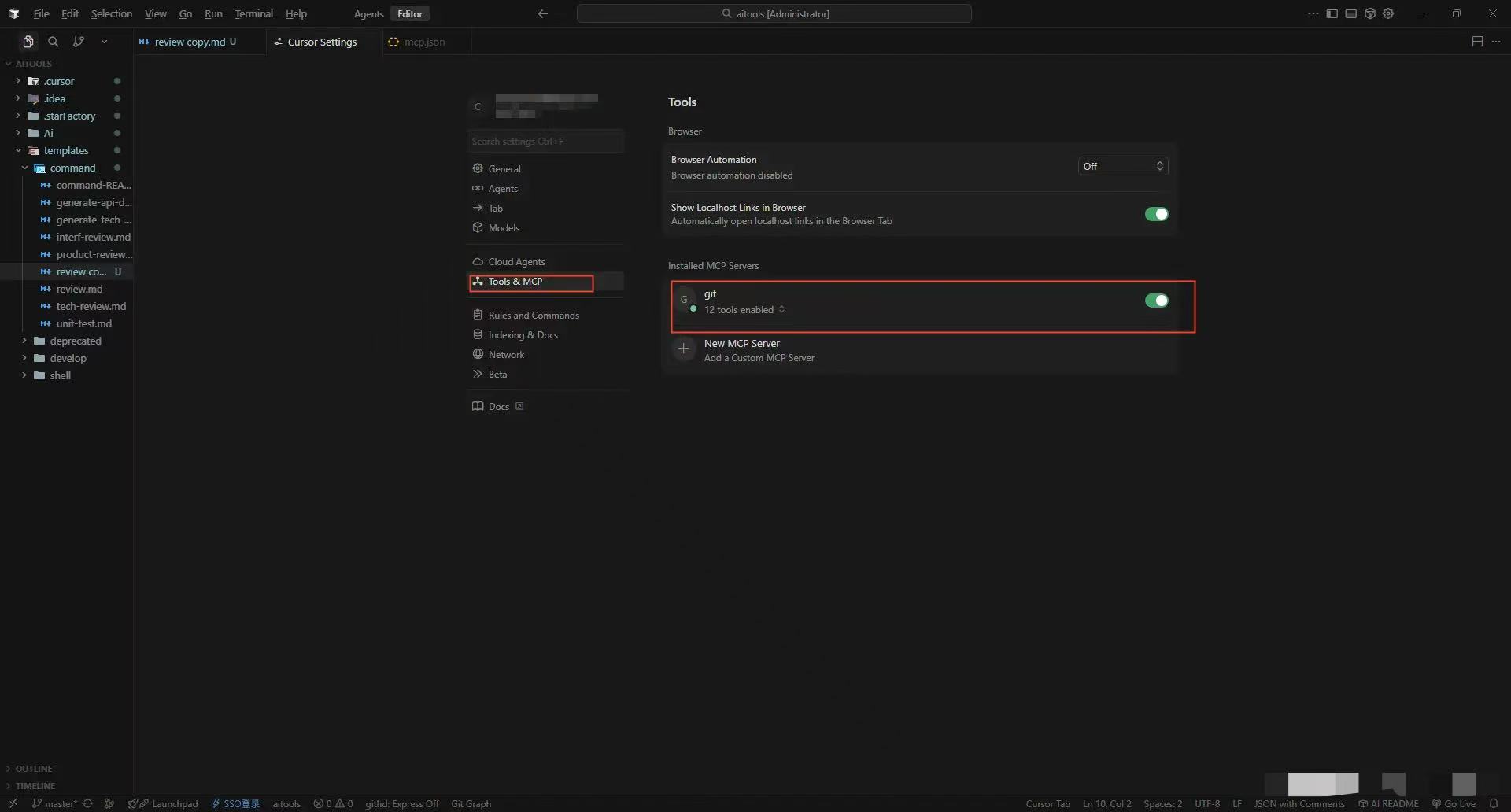
- the Git tool exposed through MCP
Example Git MCP configuration:
1
2
3
4
5
6
7
8
{
  "mcpServers": {
    "git": {
      "command": "uvx",
      "args": ["mcp-server-git"]
    }
  }
}
Review Rules in review.md
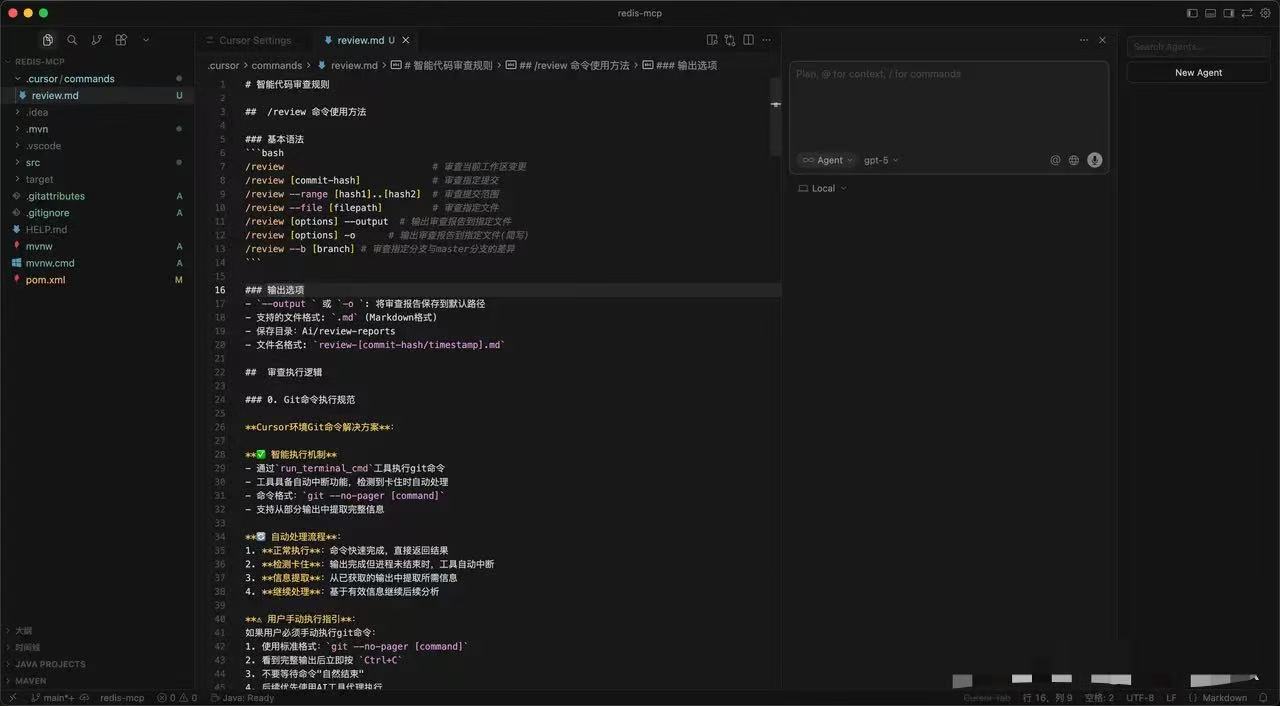
All review rules are maintained in a single review.md file.
The core idea is simple:
Turn the review experience that lives in engineers’ heads into rules that AI can execute consistently.
How the AI Review Command Works
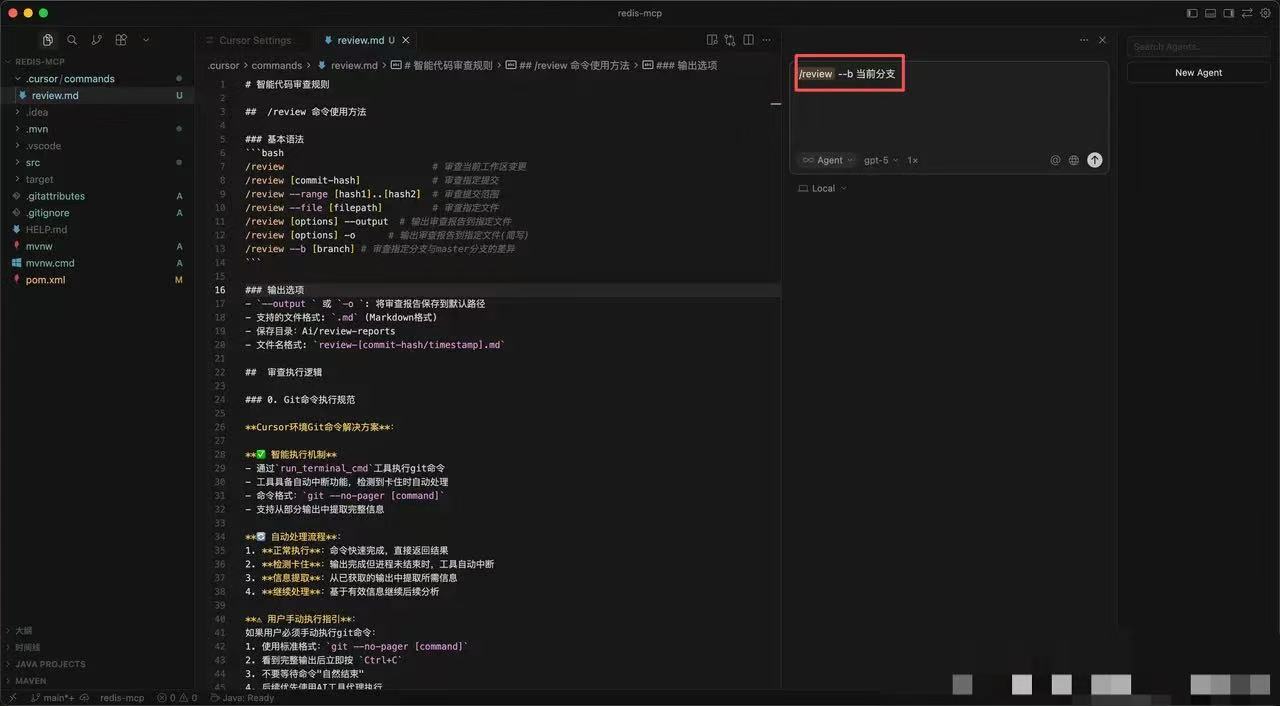
Once review.md is in place, team members only need to run one command to let Cursor perform an AI review according to the shared rules.
1
/review --b current-branch
What the command does
--b current-branch: reviews the current development branch-o: outputs a report--file: reviews a specific file
After that, the workflow looks like this:
- Cursor reads the rules defined in
review.md - it filters files by type
- it checks conventions and analyzes issues by severity
- it generates a structured report
- the report can go to the terminal, a PR comment, or a CI step
This means developers no longer need to:
- manually compare every diff first
- scan line by line for obvious low-level mistakes
Instead, they can focus on business logic and architecture decisions.
The most important design details
1. Git command execution rules
One of the most important implementation details is handling Git correctly inside Cursor.
The problem:
- Git commands can get stuck in a pager, which breaks the workflow
The solution:
- use
git --no-pager - execute commands through Cursor’s built-in
run_terminal_cmd - extract only the required information from command output
If this problem is not handled, AI-driven CR becomes unreliable very quickly.
2. Restrict the file scope
The review only scans the file types that matter most for behavior and logic:
.java.xml.properties
This keeps the review focused and avoids wasting time on noise.
3. Team convention checks
In review.md, there is a dedicated section for hard team rules, such as:
- whether methods or
Mapkey-value usage require comments - whether common logic should be extracted but was not
- whether there are redundant
if/elsebranches - whether URLs and configuration access follow a unified wrapper
The principle is straightforward:
If these issues appear, the code should not be merged.
4. Severity levels
The rules also define issue priorities clearly:
- Critical: thread safety, memory leaks, security vulnerabilities, architectural violations
- Medium: performance issues, exception handling, data consistency
- Minor: conventions, readability, maintainability
That allows:
- AI to focus on what matters most
- human reviewers to scan high-risk issues quickly
- the team to avoid getting buried in low-value detail
5. Structured report output
The final AI report includes:
- change analysis
- issue list grouped by severity
- risk evaluation
- merge recommendations
This report can be integrated directly into PR comments or CI workflows.
5. Real Results in Engineering Practice
Example:
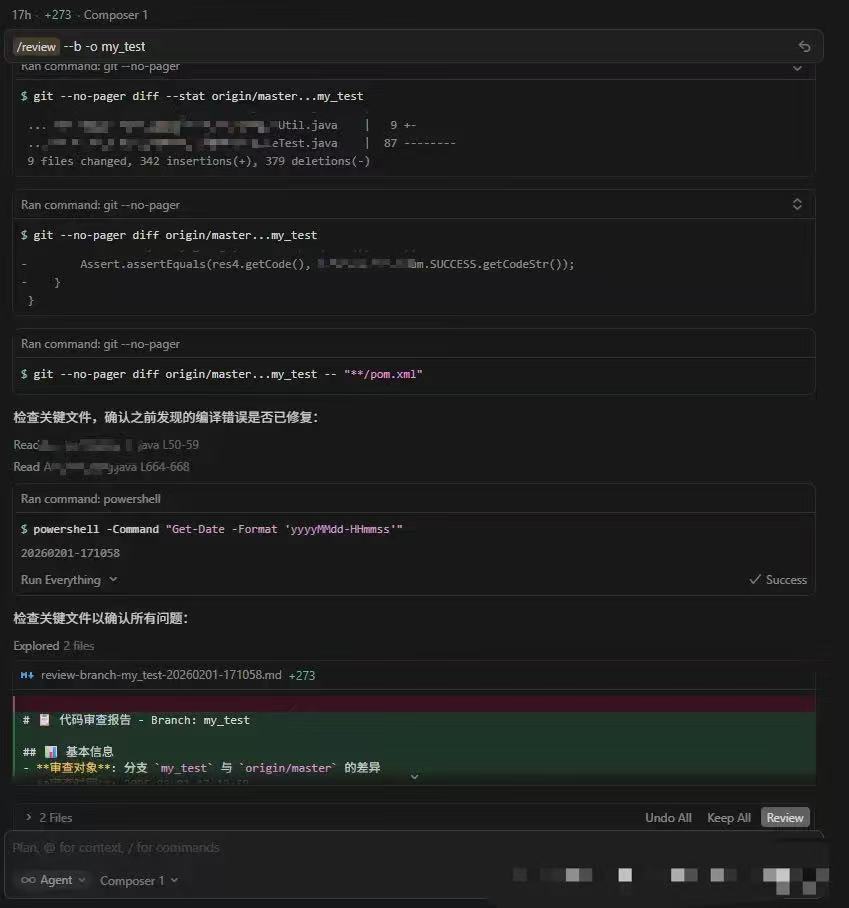
In real projects, the outcome was very direct:
- a single review dropped from 30 to 45 minutes down to 10 to 15 minutes
- naming, convention, null-handling, and similar low-level issues were intercepted much earlier
- new engineers could align with team rules much faster
- review quality became noticeably more stable
The team feedback was also very consistent:
Without Cursor as an assistant, review feels obviously more tiring.
These results matter because they show that AI code review with Cursor is not just about faster output. It is about more stable review quality, earlier defect detection, and less reviewer fatigue.
6. How to Roll This Out Across a Team
What the tech lead maintains
The leader only needs to maintain two things:
- the team convention checks that define what must be blocked
- the severity rules that decide what needs to be fixed first
At its core, this is simply engineering the lead’s experience into a reusable process.
What individual engineers do
The workflow for contributors is simple:
- sync the latest
review.md - run AI CR after finishing a module
- fix low-level issues before opening the PR
That pushes problems to the earliest possible stage.
How it fits into the delivery pipeline
- AI review output can be posted directly to PR comments
- it becomes input to the human review step
- over time, it forms a semi-automated Code Review workflow
7. Why Human-in-the-Loop Review Still Matters
I do not think this works because it is flashy. I think it works because the engineering choices are sound:
- the workflow is command-based and easy for developers to use
- it uses Cursor’s built-in
run_terminal_cmdto execute efficiently - it fixes common Git workflow issues with
git --no-pager - it avoids stale comparisons by fetching the latest remote branches before review
- it gives the team a place to encode shared review rules
- it forces explicit severity levels
- it makes the final report easy to integrate into PR and CI/CD flows
- it encourages every engineer to run AI CR locally before asking others to review
The principle behind the whole system is this:
Humans judge business logic and architecture. AI intercepts low-level mistakes.
That is the most important idea for anyone evaluating AI for code review:
- AI should reduce repetitive inspection work
- humans should keep ownership of technical judgment
- the best workflow is not AI-only, but AI-first and human-validated
8. Limitations of AI Code Review
This AI CR workflow still has clear limits:
- it cannot verify whether the real business logic is correct
- it cannot fully judge whether code matches the overall project structure
- team-level commands still need a reliable synchronization mechanism
These boundaries are important. AI review is not a replacement for engineering judgment. It is a way to remove repetitive friction, catch routine problems earlier, and make review quality more consistent across the team.
9. SEO Summary and Key Takeaways
If someone asks, “Is Cursor good for code review?” my answer is yes, with an important condition: it works best when you define shared review rules, limit the review scope, generate structured output, and keep humans in the final loop.
If someone asks, “Can AI replace pull request review?” my answer is no. But AI can dramatically improve code review speed, review consistency, and developer productivity when it is used as the first pass rather than the final authority.
If you want one sentence that summarizes the whole approach, it is this:
Let people own judgment. Let AI own repetition.