What Are AI Skills? A Beginner-Friendly Guide to Agent Skills and How to Use Them
What are AI Skills, and how do they work in agent tools like Claude-style coding assistants? This beginner-friendly guide explains Skills, how they differ from prompts, how to use them, and why they matter for real AI workflows.
What Are AI Skills? A Beginner-Friendly Guide to Agent Skills and How to Use Them
The first time I ran into Skills, I had the same reaction many people have: the name sounded simple, but the explanations online made it feel more complicated than it really is.
After using agent-style tools for real work, I realized the concept is actually straightforward. People also call them Agent Skills or Claude Skills, but the core idea is the same:
a Skill is a reusable capability package that helps an AI system handle a task in a more reliable, repeatable, and tool-aware way.
The confusion usually comes from the fact that a Skill sits somewhere between a prompt, a workflow, and a reusable tool definition.
In this article, I want to explain the idea in plain English, show where Skills are genuinely useful, and point out a few places where people often overstate what Skills can do.
Table of Contents
- What AI Skills are
- Skills vs prompts
- What a Skill usually contains
- Why Skills matter for AI agents
- A practical example
- How to use Skills in a project
- Common use cases
- Common mistakes and misconceptions
- Final takeaways
1. What Are AI Skills?
The simplest way to understand a Skill is this:
A Skill is a reusable way of solving a specific kind of problem.
In human terms, a skill is not just knowledge. It is knowledge plus method.
For example, if someone knows how to play badminton, that does not mean they only understand the rules. It means they can react to the ball, choose the right movement, and execute the right action at the right moment.
AI Skills work in a similar way.
Instead of only giving the model a one-time instruction, a Skill gives the agent a more structured way to respond to a class of tasks, such as:
- generating marketing copy
- reviewing code
- processing files
- creating reports
- designing visuals
- transforming data
So when people ask, “What are Skills in AI?” the practical answer is:
Skills help AI agents perform repeatable tasks more consistently than a single ad hoc prompt.
2. Skills vs Prompts
This is where many people get stuck.
A Skill is not just a prompt, even though prompts are often part of it.
A normal prompt
A normal prompt is usually:
- temporary
- typed directly into a chat box
- repeated manually
- easy to forget or change by accident
A Skill
A Skill is usually:
- reusable
- structured
- easier to share across workflows
- designed for repeated execution
- often connected to supporting files, templates, or automation logic
So a better way to think about it is:
A prompt is a one-off instruction. A Skill is an operational package for handling a recurring task.
That is why Skills are often much more powerful in real AI agent systems.
3. What Does a Skill Usually Contain?
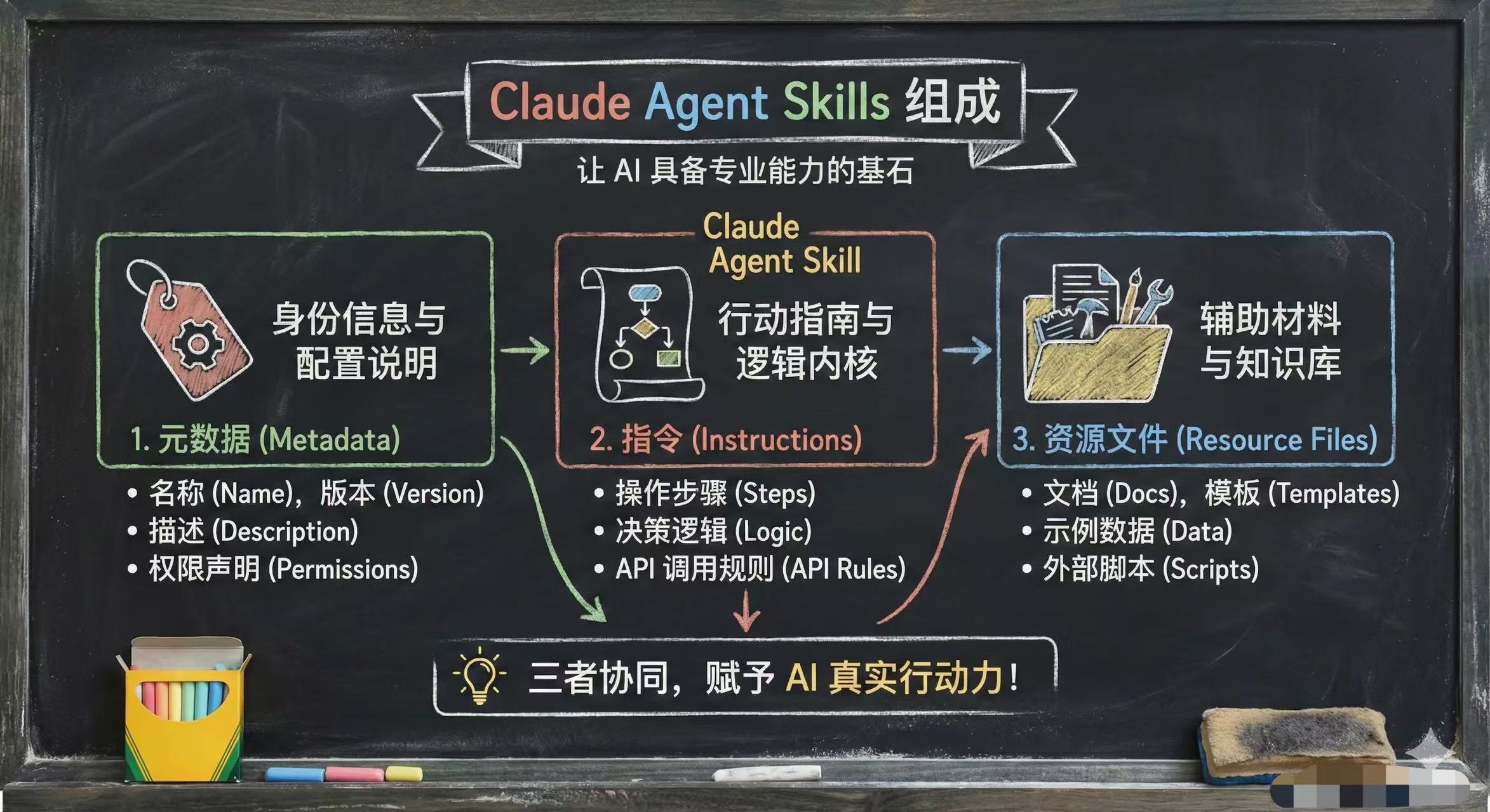
The exact structure depends on the tool or framework you are using, but a Skill often contains some mix of the following:
1. A short description or metadata
This tells the agent what the Skill is for and when it should be used.
This part is usually lightweight. In many systems, it helps the agent discover the right Skill without loading every detail into the main context all the time.
2. Instructions or an action guide
This is the core logic of the Skill.
It tells the AI how to behave, for example:
- what steps to follow
- what output format to use
- what checks to run
- what constraints to respect
This part is often prompt-like, but more structured and intentional than a normal chat message.
3. Supporting resources
This is where Skills become much more useful than ordinary prompts.
Depending on the platform, a Skill may include:
- examples
- templates
- schemas
- reference files
- scripts
- helper code
- automation assets
Not every Skill includes executable code, but many advanced Skills do rely on supporting files to make the workflow more capable and more reliable.
So the most accurate summary is:
A Skill is often a combination of instructions, context, and optional resources that help the AI solve a task in a repeatable way.
4. Why Do Skills Matter for AI Agents?
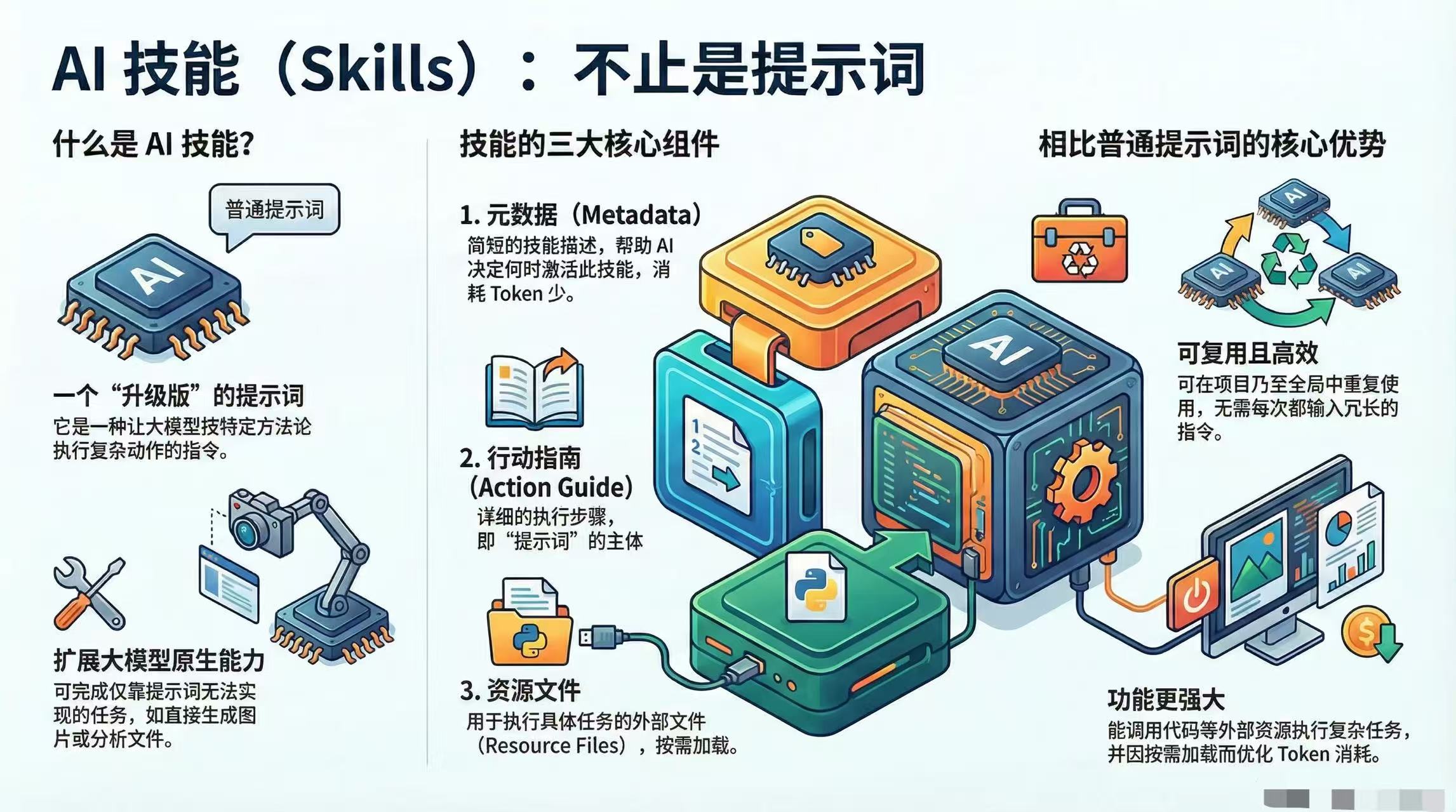
Skills matter because they help AI move beyond “answering questions” and toward “executing workflows.”
Without Skills, people often end up doing this:
- copying long prompts again and again
- manually restating formatting rules
- repeating the same workflow every session
- getting inconsistent results
With Skills, the process becomes much cleaner:
- the behavior becomes easier to standardize
- the AI can trigger known workflows faster
- teams can share repeatable agent behaviors
- complex tasks become easier to package and reuse
This is especially important in:
- AI coding workflows
- automation-heavy tasks
- file processing
- design generation
- internal team tooling
In my own workflow, this is the point where Skills stopped feeling like a buzzword and started feeling practical. Once a task repeats often enough, a plain prompt becomes annoying. A Skill gives that task a stable shape.
That is why the concept is becoming foundational in modern agent systems.
5. A Practical Example: Why Skills Are More Powerful Than Plain Prompts
Here is a more realistic example from day-to-day work.
Imagine you often ask an AI assistant to review backend changes before opening a pull request. If you do that with a plain prompt, you usually have to restate the same things every time:
- focus on risky files first
- check null handling and exception branches
- classify issues by severity
- format the output as a review report
That works, but it gets repetitive fast.
Now imagine the same task with a review Skill. The Skill can already contain:
- the review steps
- your preferred output format
- severity rules
- references to helper files or scripts
- project-specific constraints
Instead of re-explaining the review method every time, you invoke the Skill and get a much more consistent result.
That is the real value of Skills:
they give the agent a prepared way to act, not just a way to talk.
To be precise, not every AI platform supports the same level of execution. Some only use Skills as structured instructions. Others combine Skills with tools and automation. The exact capability depends on the system.
6. How to Use Skills in a Project
The exact directory structure depends on the tool you use, so avoid assuming that every platform uses the same folder names or file conventions.
That said, the workflow is usually similar.
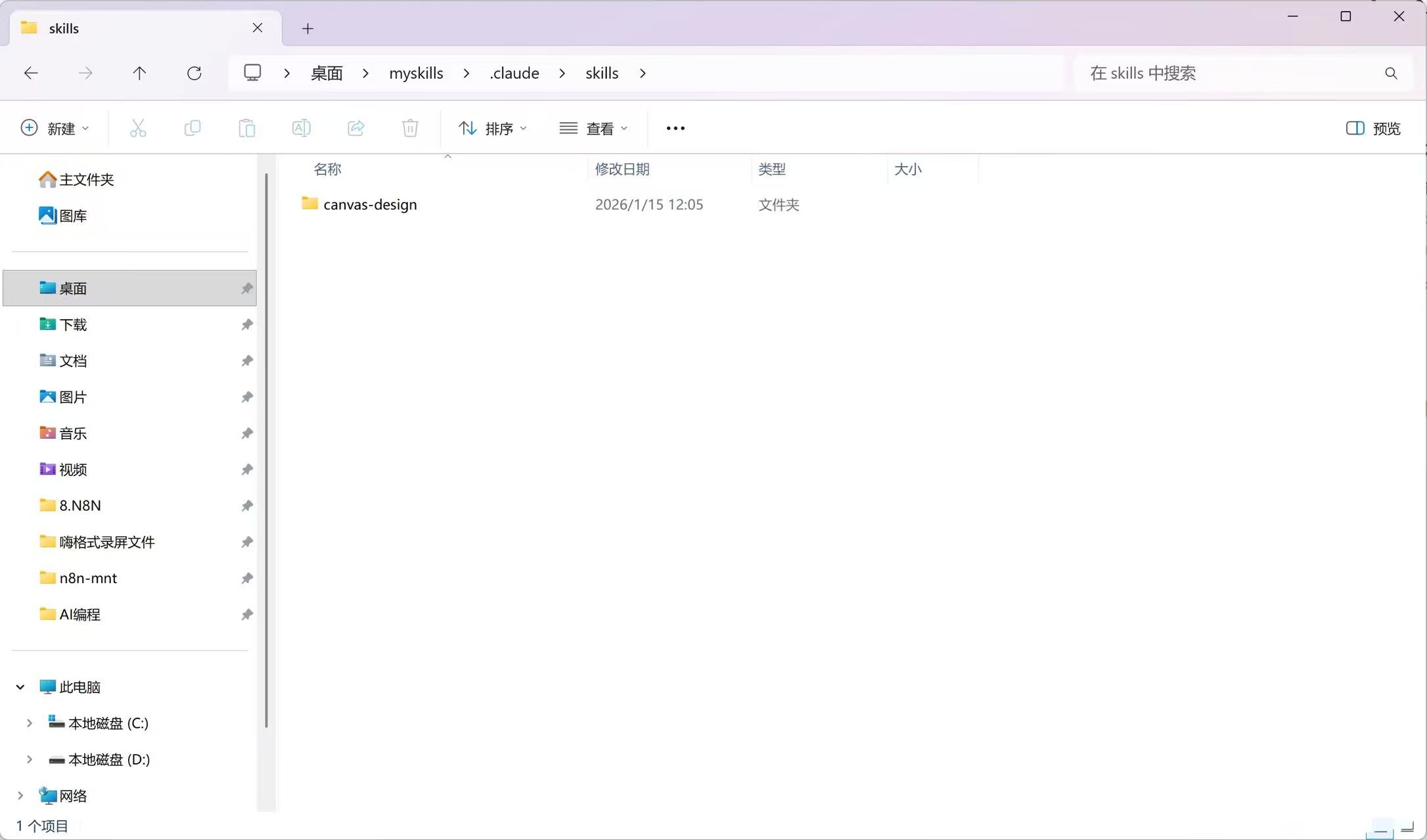
Step 1. Create or use the expected Skill directory
In many project-based agent setups, Skills live inside a dedicated folder under the project.
For Claude-style local workflows, a pattern like this is common:
1
your-project/.claude/skills
But this is an example, not a universal standard. Always follow the conventions of the actual tool you are using.
Step 2. Add a Skill package
A Skill package may contain:
- a main instruction file such as
SKILL.md - helper scripts
- examples
- templates
- assets or references
Some platforms use different naming conventions, so do not assume every Skill must use the exact same filename.
Step 3. Start your agent inside the project
Open your terminal, enter the project directory, and start the agent tool you are using.
If the system supports Skill discovery, the agent may scan the configured directory and make those Skills available automatically.
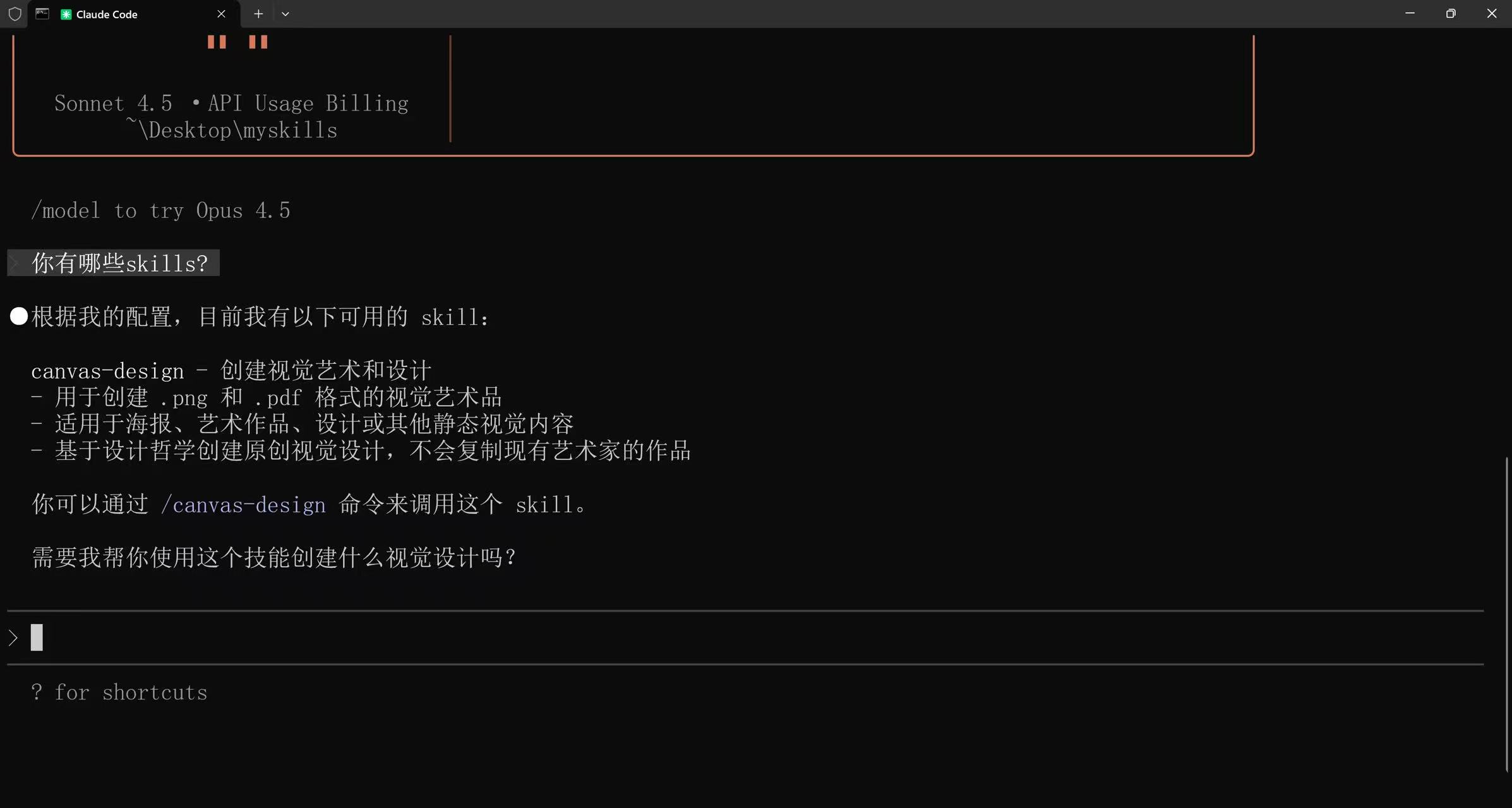
Step 4. Invoke the Skill through a real task
Then ask for a task that matches the Skill’s purpose.
For example:
1
Review this code with our backend review skill.
or
1
Generate a product poster using the design skill.
In many agent tools, you do not always need to manually name the Skill. If the Skill is well described, the system may choose it automatically when the request matches.
The most important lesson here is practical, not theoretical:
a Skill becomes valuable when it saves you from repeating the same setup over and over again.
If a task is truly one-off, a normal prompt is often enough. If it keeps coming back, packaging it as a Skill usually pays off.
7. Common Use Cases for Skills
Skills are especially useful when a task is repeated often and benefits from structure.
Some common use cases include:
- code review
- bug triage
- documentation generation
- blog post drafting
- file conversion
- data extraction
- spreadsheet processing
- content localization
- design task automation
- report generation
In other words, Skills work best when the problem is not totally new every time, but similar enough that a reusable workflow helps.
8. Common Mistakes and Misconceptions
There are several common misunderstandings around Skills.
Mistake 1. Thinking Skills are just long prompts
They can contain prompt-like instructions, but the real value is that they are reusable, organized, and often connected to supporting context or tools.
Mistake 2. Thinking every Skill can run code
Some Skills are instruction-only. Others include scripts or tool integrations. It depends on the platform and the Skill design.
Mistake 3. Assuming every agent uses the same structure
Different tools may use different directories, file names, or loading rules. Do not copy one tutorial blindly into another ecosystem.
Mistake 4. Expecting Skills to replace judgment
Skills improve consistency, but they do not automatically make every result correct. Outputs still need validation, especially for coding, design, and business-critical workflows.
Mistake 5. Overengineering too early
If you only need something once, a normal prompt may be enough. Skills are most valuable when the task is repeated, shared, or complex enough to justify packaging.
9. Final Takeaways
After working through the idea in practice, I think the shortest useful explanation is this:
An AI Skill is a reusable capability package that helps an agent perform a specific kind of task more effectively than a one-off prompt.
That is why Skills are becoming so important in AI agents, Claude-style coding workflows, and automation systems.
They help bridge the gap between:
- asking for something once
- building a repeatable AI workflow
If you are just getting started, remember these three points:
- A Skill is more than a prompt.
- A Skill usually combines instructions with reusable context and optional resources.
- Skills are most useful when you want repeatable, sharable, and more tool-aware AI behavior.
If you are learning AI agents in 2026, understanding Skills is one of the clearest ways to move from casual prompting to real workflow design.
For me, that is the biggest shift: Skills are not interesting because they sound advanced. They are useful because they turn repeated AI work into something you can organize, reuse, and improve over time.